Tuesday, May 14, 2024

Mobile Technology and Libraries


Almost everyone has a mobile device from children to older adults and libraries have had about 20 years in the mobile technology game. Technology is always evolving, and libraries need to keep their mobile knowledge up to par. With a smartphone screen different from a PC’s, layouts need to be modified and “more suitable for the smartphone” (Bohyun). Having accessible top search links on the home screen of mobile sites creates easier accessibility. Some of those would be hours & location, catalog, My account, and collections. Users can also use features to reserve a study room or a computer at their library using mobile technology. I can say I've used my device to check the library hours and renew a book.

Students at Kent State University had suggestions for their mobile library website such as catalog searches, placing holds, receiving text when items are available and reminders for due dates, customizing databases (favorites), and live chat with the librarian (Bohyun). I agree, that accessing the mobile online library catalog and placing a book on hold is very convenient, especially when you're waiting at the DMV or other places that take lots of your time. 

Mobile technology also has built-in accessibility features to help users with visual impairment such as screen filters, color invert, digital magnification, and voice-over features (Biersdorer). 

By: Estela Perez

Works Cited

Bohyun Kim. “The Present and Future of the Library Mobile Experience.” Library Technology Reports, vol. 49, no. 6, Aug. 2013, pp. 15–28. EBSCOhost, search.ebscohost.com/login.aspx?direct=true&db=f6h&AN=90405355&site=ehost-live&scope=site.

BIERSDORFER, J. D. "The Built-In Accessibility Features of iOS." New York Times (Online)New York Times Company, 2016. ProQuestlogin.ezproxy.palomar.edu/login?auth=shibboleth&url=https://www.proquest.com/blogs-podcasts-websites/built-accessibility-features-ios/docview/1845285258/se-2.

Assistive Technology and Libraries

(Assistive Technology)

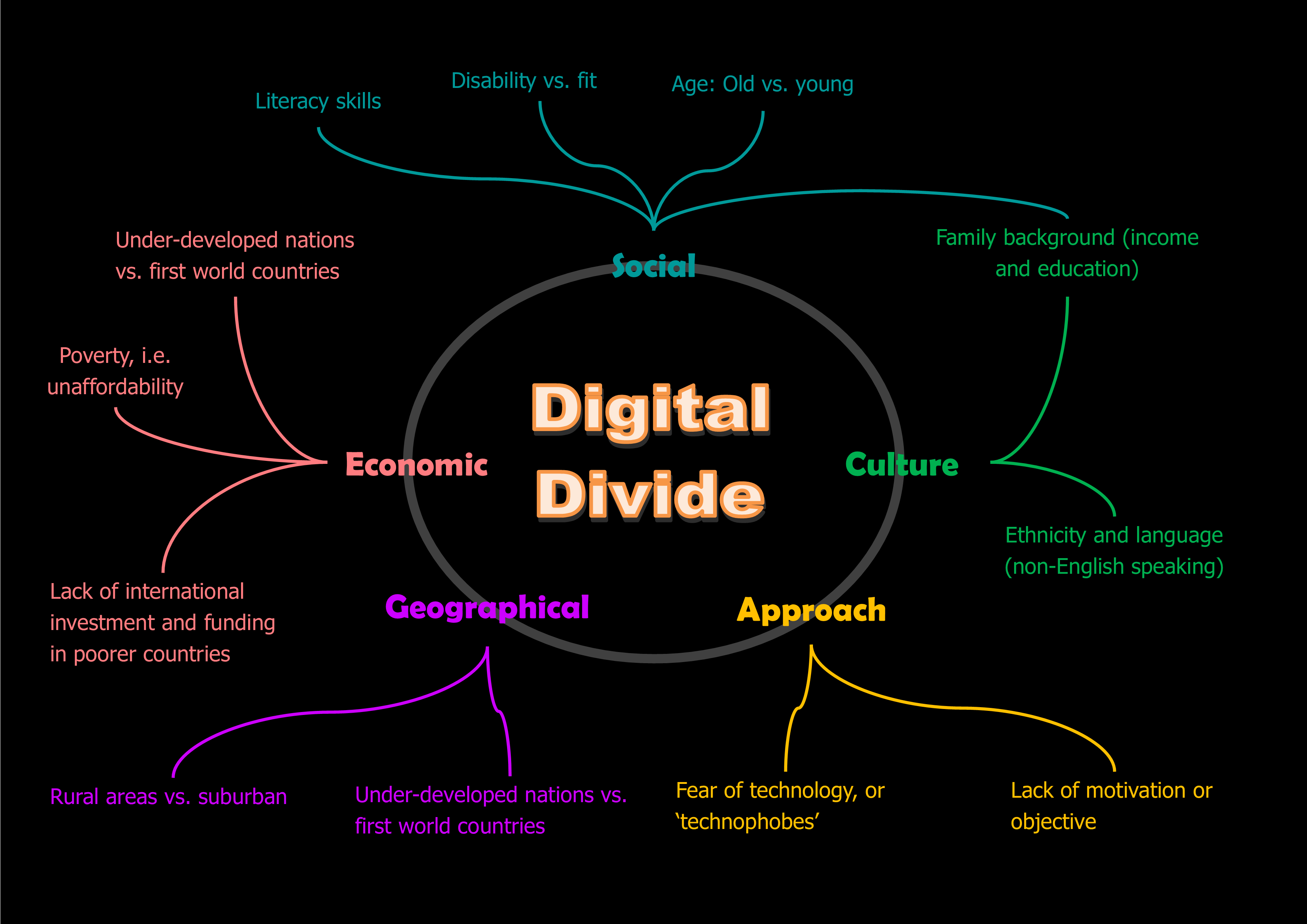
Libraries are places where individuals from all ages and walks of life can seek information on almost anything using physical resources, online resources, and information given during library programming. One way libraries are continuously creating ways to bridge the digital divide is by providing assistive technologies per the Americans with Disabilities Act (ADA) making libraries more accessible to individuals with disabilities (Hopkins).

Having assistive tools in the library helps a partially or completely blind person use assistive technology by sound or text-to-speech on a computer to access the internet also, a person with mobility issues might use devices like scanning software, large or small keyboards, and trackballs (Mates). These technologies in the library are a gem to individuals who benefit from their use and help make life a little easier.
I found it fascinating that Andrew Heiskell Braille and Talking Book Library held an event in 2017 during an eclipse, providing visitors “visually impaired” to hear and feel the eclipse using verbal descriptions and vibrations (Alfaro) This was one way the library created inclusivity thanks to the knowledge of staff and Nasa who created the app. Libraries can seek help from organizations to support implementing a more inclusive library. You can find some of the links to these organizations on the sidebar of this blog.

By: Estela Perez

Works Cited

Alfaro, Mariana. "Events Across New York Will Offer Ways to Watch the Eclipse; Even those who did little planning will be able to catch the astronomical phenomenon at a library--or bar." Wall Street Journal (Online), Aug 19, 2017. ProQuesthttps://login.ezproxy.palomar.edu/login?auth=shibboleth&url=https://www.proquest.com/newspapers/events-across-new-york-will-offer-ways-watch/docview/1930092848/se-2.
Hopkins, Janet. “Assistive Technology for the School Library.” Library Media Connection, vol. 21, no. 6, Mar. 2003, p. 46. EBSCOhost, search.ebscohost.com/login.aspx?direct=true&db=f6h&AN=9351367&site=ehost-live&scope=site.

Mates, Barbara T., and Char Booth. “Information Power to All Patrons.” Library Technology Reports, vol. 48, no. 7, Oct. 2012, pp. 7–13. EBSCOhost, search.ebscohost.com/login.aspx?direct=true&db=a9h&AN=83242900&site=ehost-live&scope=site.

Libraries and the Digital Divide


(Reynolds)


Bridging the gap in the digital divide is an essential task that libraries undertake. Library users ranging from ages 0-80+ years old and socio-economic ranges that span just as wide, libraries must make it an objective to serve all. How do they do that, a lot of work that’s how. Libraries provide computer access, wireless internet access, laptops, and some libraries even have tablets to borrow.  In some libraries, users check out mobile hotspots because they do not have internet access at home (Lee King).

Individuals with disabilities face challenges in social, economic, and educational settings and as “Baby Boomers” age they become susceptible to diseases that affect eyesight, joints, and cognitive functions, and numbers in this group are predicted to increase 100% by 2030 (Mates).  Libraries are digitally inclusive places, with access to digital resources, support, and skills providing users with the latest technologies at no cost. Users who may not have had access previously can benefit from their public library.

By: Estela Perez

Works Cited
Lee King, David. “Chapter 4: The Digital Divide.” Library Technology Reports, vol. 57, no. 2, Feb. 2021, pp. 24–28. EBSCOhost, search.ebscohost.com/login.aspx?direct=true&db=f6h&AN=148951874&site=ehost-live&scope=site.

Mates, Barbara T., and Char Booth. “Information Power to All Patrons.” Library Technology Reports, vol. 48, no. 7, Oct. 2012, pp. 7–13. EBSCOhost, search.ebscohost.com/login.aspx?direct=true&db=a9h&AN=83242900&site=ehost-live&scope=site.

Reynolds, Dennis. “Digital Divide Part 2” Dennis Reynolds, 29 Jan. 2016, PennStatesites.psu.edu/dennisreynolds/2016/01/29/digital-divide-part-2/.  Accessed 11 May 2024

Blog archive Gadget added by Alicia Jones

 Hi 

I have added a Blog Archive gadget on the right sidebar. This is a good tool to quickly look at past blog posts. 

Alicia Jones 

Digital Storytelling and Libraries

 Digital Storytelling and Libraries

By Rachel T.


Image created with Canva


I’m familiar with digital storytelling through StoryCorps, a nonprofit organization that elevates the stories of seemingly ordinary people. StoryCorps releases incredible and touching stories. If you haven’t listened to these audio stories (which are sometimes accompanied by images), then you must stop and visit their website now… storycorps.org/stories


At my local public library, there are no current programs offering digital storytelling. I imagine that many public libraries are interested in this type of storytelling, though, and they may be starting programs before long. Writing for the American Library Association (ALA), Sara Goeke (n.d.) describes three possible goals of digital stories - pedagogy, engagement, and communication. When starting a new program, it’s important for library workers to consider the goals of the program, as well as community interests and needs. In my opinion, digital storytelling provides an opportunity for patrons to improve digital literacy skills and to feel more engaged with their library and community. In the public library setting, the main goal might be engagement.


In “Digital Storytelling in Different Library Settings,” Czarnecki (2009) interviews librarians who are already implementing digital storytelling programs in academic, public, and special libraries. They share their successes and the details of their programs. Check out the article for tips before starting your own program! 


Works Cited:


Czarnecki, K. (2009). Digital Storytelling in Different Library Settings. Library Technology Reports, 45(7), 20-. https://caccl-palomar.primo.exlibrisgroup.com/permalink/01CACCL_PALOMAR/juba46/cdi_proquest_journals_202742950 


Goeke, Sara S. (n.d.). Keeping Up With... Digital Storytelling. American Library Association. (n.d.). https://www.ala.org/acrl/publications/keeping_up_with/storytelling  


Monday, May 13, 2024

Blog Gadget: Palomar Library Links

 by Shannon C. 


I have added a link gadget to the side bar for the Palomar College Library and the LIT Program.

Virtual Reality and Libraries: Emerging Technology in the School Library

by Shannon C. 


Virtual reality (VR) is an advancing technology that is now readily available to the public. Essentially, VR is a immersive experience that includes the users senses of sight, hearing and touch (Pope, 5). To ignore it’s potential impact on education would be a mistake, as technology evolves and educational programs become more sophisticated and abundant, educators and school librarians should consider how to integrate it into the curriculum. VR is only going to become more popular and today’s students should be familiar with it as a tool for deeper learning considering they may be utilizing this technology in their future academic and professional careers. 


Since the technology is less cost prohibitive than it used to be, school libraries should consider purchasing VR devices. There are a number of VR applications geared toward education including Star Chart, an exploration of constellations (Pope, 15).  More apps geared toward learning include, Land of the Dinosaurs, a virtual experience exploring the dinosaurs, and Unimersiv suite of virtual reality apps, which include virtual experiences like exploring the Titanic and the International Space Station (Pope, 19). Another way to utilize this technology would be in “virtual field trips”. The VR Museum of Fine Art would allow students to experience famous artworks, and Google Earth VR gives the user the benefit of traveling anywhere in the world right from the library (Pope, 5).


Overall, the VR technology would give educators and students more options to enhance their learning and should be seriously considered as a part of the school library experience and as a tool for research. 


Watch the video below to see how VR technology is utilized in a "Metaverse school" to support learning outcomes:


While this is obviously more immersive than a regular school library would offer, you can see how the VR technology could be used to enhance learning. 


I understand that this type of technology would not be in the budget for some school libraries, and financial resources are allocated to meet school and library needs. For those schools, this is just something to keep on their radar as it becomes more readily available and less cost prohibitive. 


Pope, Hannah. “Virtual and Augmented Reality in Libraries.” 
    Library Technology Reports, vol. 54, no.  6, Aug. 2018, pp. 1–25. EBSCOhost,
    search.ebscohost.com/login.aspx? direct=true&db=a9h&AN=131380062&site=ehost-                          
    live&scope=site.

Newest Post

Virtual Reality and Libraries

 Virtual Reality is a new tool for learning. Public Libraries are key locations for making virtual reality technology more accessible to the...